Finding work with your phone: WhatsApp and Kamerjob in practice

Your phone can help you find vacancies, prepare a CV and speak with recruiters. But forwarded job adverts and files you cannot find can quickly make your search confusing. Here is a simple way to look for work in Cameroon using WhatsApp and Kamerjob, even without a computer.
1. Get your phone ready before applying
First, check your phone number: it should be correct on your CV, and recruiters should be able to reach you. Choose a WhatsApp display name that makes you easy to identify. A profile photo is optional. If you use one, choose a simple picture you are comfortable showing to professional contacts.
In your phone’s file manager, create a folder called “Job search”. Keep your current CV and the documents actually requested there. Give your CV a clear filename, such as CV_Firstname_Lastname_Sales.pdf. Open it to check that the text is readable and no pages are cut off. Keep a copy before editing your document.
Need a CV? The Kamerjob CV builder is a useful starting point. If your background mainly involves casual work or helping a family business, read our guide on creating a CV without qualifications or formal work experience. Describe only the tasks you can actually do.
Data-saving tip: draft your messages in your phone’s notes and review your CV before turning on mobile data. If your data allowance is limited, avoid downloading the same document repeatedly or watching videos unrelated to the vacancy.
2. Find a vacancy on Kamerjob and read it carefully
- Open Kamerjob’s job listings in your phone’s browser.
- In the keyword field, try a specific role: “sales assistant”, “kitchen assistant”, “cleaner” or “hairdresser”. Try French equivalents too, as adverts may use either language.
- Choose useful filters, such as region, sector or contract type. On a small screen, scroll to find the available options.
- Open a suitable vacancy and check the location, duties, requirements, deadline and application instructions.
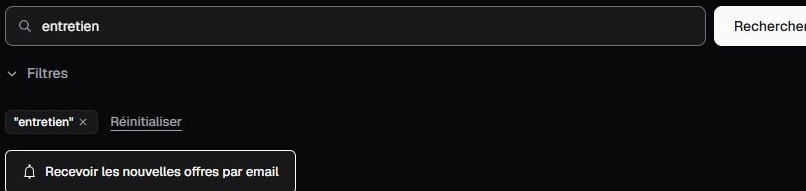
Visual guide: Kamerjob’s search area, captured on 17 October 2026. The screenshot shows the French interface. The layout and results may change. Try one keyword at a time before adding several filters.
Practical example: you are looking for restaurant work in Douala. Try “cuisine”, then search separately for “serveur”, and select the Littoral region. Check the town and working hours in each advert: a job in the same region may still be too far from home.
If you find few results, remove a filter or try another job title. “Junior” does not automatically mean “no qualifications required”: always read the requirements. Save the vacancy link in your notes so you can return to the full advert.
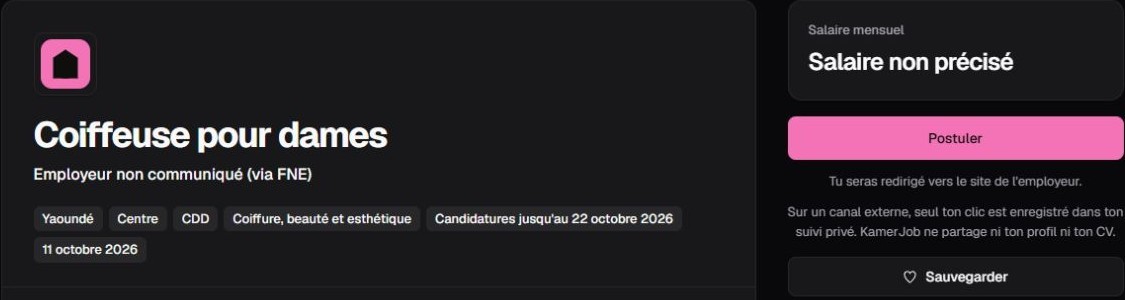
Example vacancy captured on 17 October 2026: look for these details before applying. This screenshot explains the interface; it does not mean the vacancy is still open.
Use the application channel requested. If the advert asks for an email or an online form, follow those instructions. Contact the recruiter on WhatsApp only when the advert allows it or the recruiter invites you to do so. An application button does not always lead to WhatsApp.
In pictures: applying for a vacancy that accepts WhatsApp
These screenshots show the Kamerjob website’s flow for a vacancy accepting WhatsApp applications. Other adverts may use a different channel. On a phone, scroll through the vacancy to find the application area.
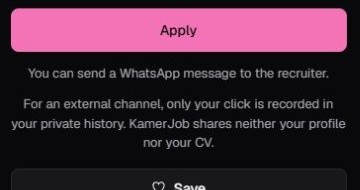
Step 1: after reading the vacancy, click “Apply”. The text below the button explains that this role uses WhatsApp.
- If asked to sign in, sign in on Kamerjob and return to the vacancy.
- In “Apply via WhatsApp”, edit “Your message to the recruiter”: include the exact role, your experience and your availability. Replace the bracketed placeholders.
- Review your text and choose “Open WhatsApp”. Check the recipient and message in WhatsApp, attach your CV if the advert requests it, then send the application yourself.
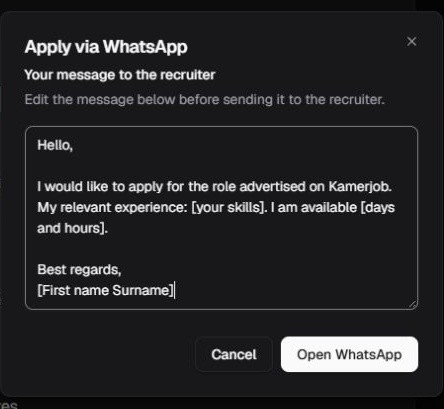
Step 2: personalise the message before moving to WhatsApp. Demonstration from 18 October 2026 using generic placeholders; no application was sent.
Remember: opening this window or clicking “Open WhatsApp” does not establish that a message was sent to the recruiter. For this external channel, the site states that only your click is recorded in your private history: Kamerjob does not send your profile or CV. Attach requested documents yourself through the specified channel. The “WhatsApp” link in “Share this job” shares the advert; use “Apply” for the application flow.
3. Send a clear, relevant WhatsApp message
Your first message should explain who you are, which job you want and what you can offer. Avoid sending only “Hello” and waiting, copying a message without the job title, or sending long unsolicited voice notes. Write a few clear lines in the language requested in the advert, without inventing skills.
To apply for a vacancy that accepts WhatsApp applications
Hello, my name is [first name and surname]. I am contacting you about the [job title and reference] vacancy I saw on Kamerjob. I live in [town] and have experience in [two relevant tasks]. I am available from [date]. Please find my CV attached. Thank you for considering my application.
Replace every item in brackets and attach the correct file. Send your CV as a document if the recruiter requests a PDF, rather than as several screenshots. Check the recipient before sending. If you attach the wrong file, explain the mistake and clearly identify the version they should use.
To ask about information missing from the advert
Hello, I would like to apply for the [job title] vacancy, reference [reference]. Could you please confirm [the neighbourhood where the job is based / the working hours / the document required]? This will help me check my availability. Thank you.
Ask a specific question. When asking someone you know for leads, you could write: “I am looking for work as a [role] in [town]. I can do [two tasks]. If you see a suitable vacancy, could you send me the link? Thank you.” Ask whether they are willing to help before sending them your CV to share.
4. Track your applications and follow up politely
In your notes, keep one line per application: date — role — employer — link — application channel — next action. A fictional example: “18 October — kitchen assistant — Example Restaurant — advert link — email sent — check for replies on Friday”.
Check your email inbox and spam folder too. A WhatsApp tick, or a lack of reply, does not tell you the outcome of a recruitment process. Keep looking for other opportunities while you wait.
Respect any response timeframe the recruiter gives. If none is mentioned, you may consider one follow-up after a few working days, without making repeated calls:
Hello, I am following up on my application for the [job title] role, sent on [date]. I remain available for a conversation and can provide any further information you need. Thank you.
If you are invited to an interview, confirm the date, time, location or meeting link, and the name of the person you will meet. Add these details to your phone’s calendar. Let the recruiter know promptly if you cannot attend.
5. Protect your information and check forwarded adverts
A message shared in a group deserves checking, even if it comes from someone you know. Look for the full advert, its date and company contact details you can verify independently. Be cautious about guaranteed job offers, pressure to act immediately and requests for Mobile Money payments to “reserve” a position.
- Do not post your full CV in a group open to strangers. It contains your contact details.
- Avoid sending your national identity card, bank details or other sensitive documents in an initial exchange. Verify the recipient’s identity and why they need the information.
- Never share your WhatsApp verification code, PIN or payment code. A recruiter does not need these to review your CV.
- Do not install an app or APK file sent by a stranger to “unlock” an application.
- If a Kamerjob advert seems suspicious, use the reporting options or the contact page, and keep the advert’s link.
WhatsApp recommends enabling two-step verification and never sharing your codes. Read its official security guidance to help protect your account.
Your starting routine: prepare a readable CV, find two suitable vacancies, check their instructions, send a tailored application and record what you have done. Following up on a few organised applications can help you stay on track and respond to recruiters with more confidence.
Cover photo: Tima Miroshnichenko / Pexels. Illustrative stock photograph; the person pictured is not presented as a jobseeker in Cameroon. Screenshots: Kamerjob.
The Kamerjob team
Comments
Loading comments…