Remote work: what payment information should you send to an overseas company?

An overseas company asks for your “payment details”. Should you send an IBAN, a Mobile Money number, an invoice or an identity document? The answer depends on your working arrangement, currency and agreed payment method.
Prepare a short payment information sheet with the exact details needed to receive funds. This guide is for professionals working remotely from Cameroon. Examples are fictional; no usable bank details are published.
1. First clarify whether you are an employee or a contractor
For employment, ask human resources about the payroll process, required documents and the channel for submitting them. For independent services, confirm the quotation or assignment contract, the invoice required and who approves payment. Do not assume a freelance invoice is an automatic substitute for payroll.
Question to ask: “Could you confirm whether this is a salary payment or payment of a service invoice? What currency and payment method does your team use for someone based in Cameroon?”
Check that your bank or payment provider accepts this kind of payment. An account that receives certain currencies does not necessarily support every network, sending country or income category.
2. Prepare your payment information sheet
- Beneficiary name: copy the exact account holder shown in your bank’s or provider’s receiving instructions.
- Currency: specify EUR, USD or the agreed currency. “Dollars” alone can be ambiguous.
- Receiving details: use the fields provided for the chosen network rather than recreating them from memory.
- Amount and due date: restate the agreed amount, date and fee allocation.
- Reference: include the invoice number or required payment reference.
- Professional contact: explain how to reach you if payment is rejected or information is missing.
Avoid a screenshot of your entire dashboard: it could reveal your balance, other clients or unrelated transactions. Prefer dedicated receiving instructions or an account details document, after reviewing it.
3. Match the details to the payment method
A euro transfer
The payer may request the beneficiary name, IBAN and, depending on the route, BIC/SWIFT and the bank’s name or address. Confirm the supported network with your provider. A EUR payment does not necessarily use SEPA: the sending country and bank also matter.
A US dollar transfer
For a US domestic route, instructions may include an account number, routing number and account type. International transfers may require different fields. ACH, wire and SWIFT details are not automatically interchangeable: send the instructions for the network actually supported.
A payment link
Share the link created for the correct invoice, amount, currency and service description. Confirm that the client accepts this method. The payer enters card information on the provider’s payment page; do not ask them to send it to you in a message.
A Mobile Money payment
Only if the company’s payment process supports it, provide the country, operator, number including country code and requested beneficiary name. A Mobile Money number does not replace international transfer details when the company does not offer that channel.
4. SupraPay example: share receiving details, not account access
SupraPay’s public website presents USD/EUR receiving details and payment links. If you use this service, wait for confirmation of access and receiving details, then share the information actually displayed for your account and transaction.
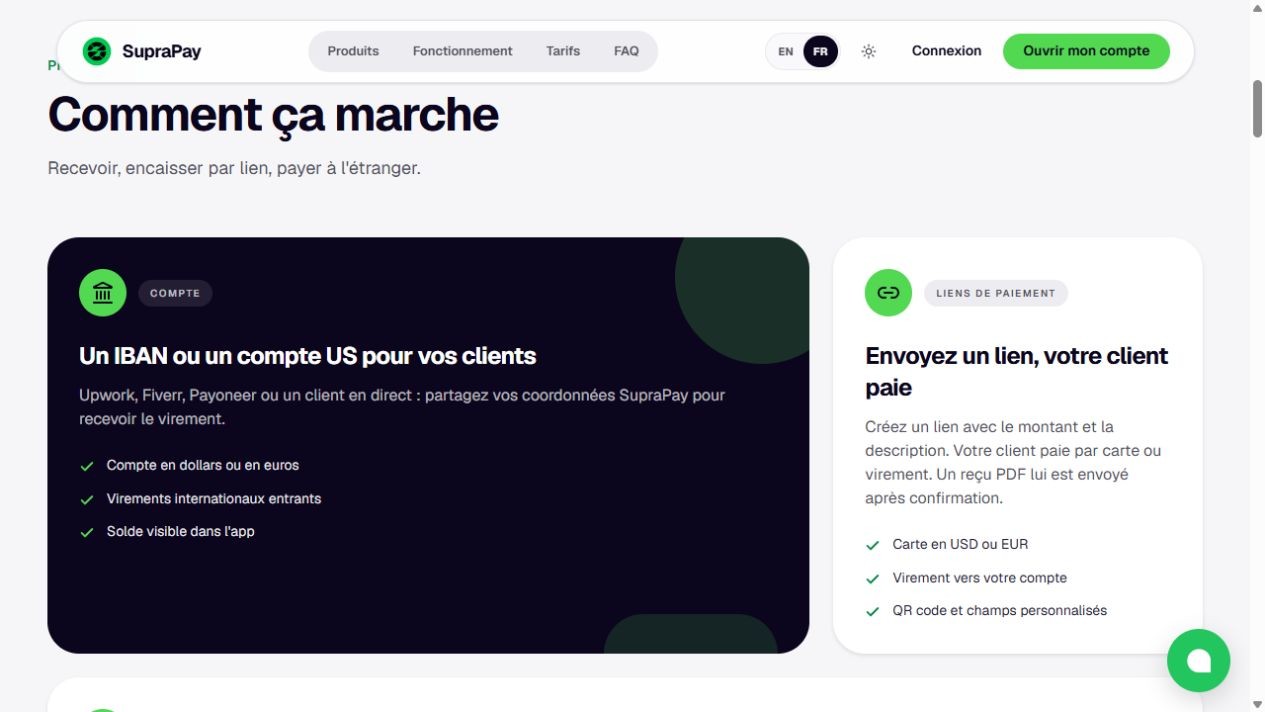
French public website screenshot from 18 October 2026. The left panel describes receiving details and the right panel describes payment links. This service overview contains no customer account data and does not establish that your payment will be accepted.
Ask which network is supported, what limits or checks may apply and what fees will be charged. Receiving payment into an account and later withdrawing to a Mobile Money wallet are separate steps. The client should not have to infer one from the other.
Our article on receiving overseas client payments with SupraPay explains the advertised process and checks to make. No transfer or customer account was tested for this guide.
5. An email template for the accounts team
Subject: Payment details — invoice [reference]
Hello [name],
For [service description], please find the payment information below:
• Beneficiary: [exact account holder name]
• Amount and currency: [amount] [EUR/USD/other]
• Due date: [agreed date]
• Method and network: [confirmed method]
• Receiving details: [exact fields from your receiving instructions, or payment link]
• Payment reference: [reference]
• Fees: [agreed allocation]
Please confirm these details meet your process before making payment. Let me know if another field is required. I will confirm receipt after checking my account.
Best regards,
[Name and professional contact]
Fictional example: a video editor in Yaoundé invoices an agency for EUR 300. He repeats the invoice reference and due date, then shares the EUR instructions confirmed by his provider. He does not send his balance or password. EUR 300 illustrates an invoice, not a recommended price.
6. Keep secret codes private and check unusual requests
Receiving payment does not require sharing your password, Mobile Money PIN, one-time login code or card security code. Do not give someone remote access to your account to “help” them pay you.
A company may have a beneficiary verification process or request administrative documents. Ask about their purpose, recipient and secure submission channel before providing personal information. Do not post an identity document in a group or assume a WhatsApp request genuinely comes from the accounts team.
If receiving details change, confirm them through a previously known contact before payment. Check the payment status and received amount yourself: an email or screenshot from the payer does not by itself establish that funds are available.
Before sending: review the name, currency, network, receiving details, reference and fees. Share only what the person handling payment needs, and retain the version you sent.
Sources checked on 18 October 2026: SupraPay public presentation; Wise, receiving USD payments and how receiving details work, illustrating differences between networks. Wise’s requirements are not presented as SupraPay’s requirements. Always check your own provider’s instructions.
Cover photograph: SHVETS production / Pexels. Illustrative image.
The Kamerjob team
Comments
Loading comments…