Freelancing in Cameroon: how to receive payment from an overseas client with SupraPay
You are building a website, editing videos or providing consulting services for an overseas client. The work is progressing, but one question remains: how will you receive payment in Cameroon? Before delivery, agree on the currency, payment method and fees.
SupraPay advertises USD or EUR receiving details, payment links and Mobile Money withdrawals. This guide explains how to prepare that process using the service’s public information checked on 18 October 2026. The examples are fictional; we have not carried out a transaction or tested a customer account.
1. Agree on the assignment before requesting payment
A payment tool does not replace an agreement about the work. Confirm the scope, deliverables, price, currency, deadlines and who pays the fees. If you require an advance payment, specify the amount and what it triggers.
Fictional example: a developer in Douala builds a small business website for EUR 400. She proposes EUR 200 before starting and EUR 200 at the agreed delivery stage. The quotation specifies the included pages and revision rounds. These amounts illustrate a project arrangement, not a market rate.
Ask whether the client’s accounts team accepts the receiving details or link you intend to use. For work obtained through a freelance platform, follow its payment rules and check its permitted withdrawal methods: its name appearing on SupraPay’s website does not guarantee that every configuration will be accepted.
2. Understand the two receiving methods SupraPay presents
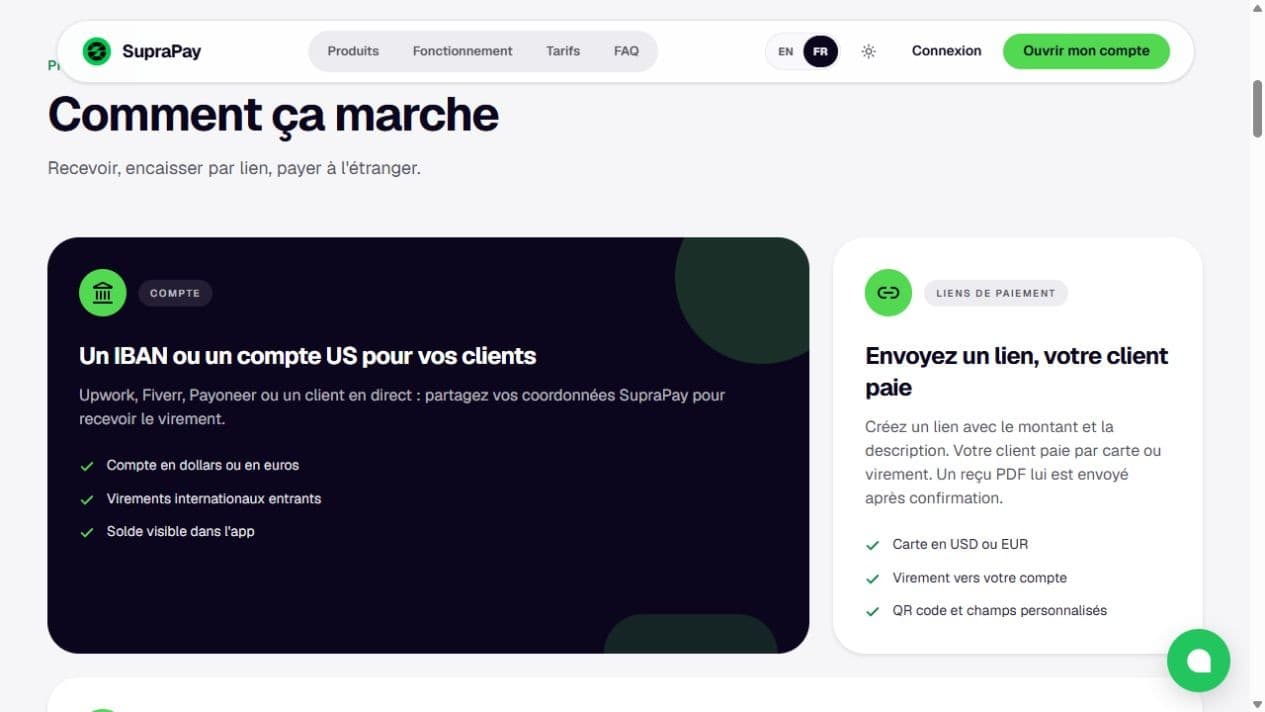
- Bank transfer: the website advertises an IBAN or US account details to share with clients, with a balance visible in the app.
- Payment link: the website says you can set an amount and description, then send a link for payment by card or bank transfer. A PDF receipt is advertised after confirmation.
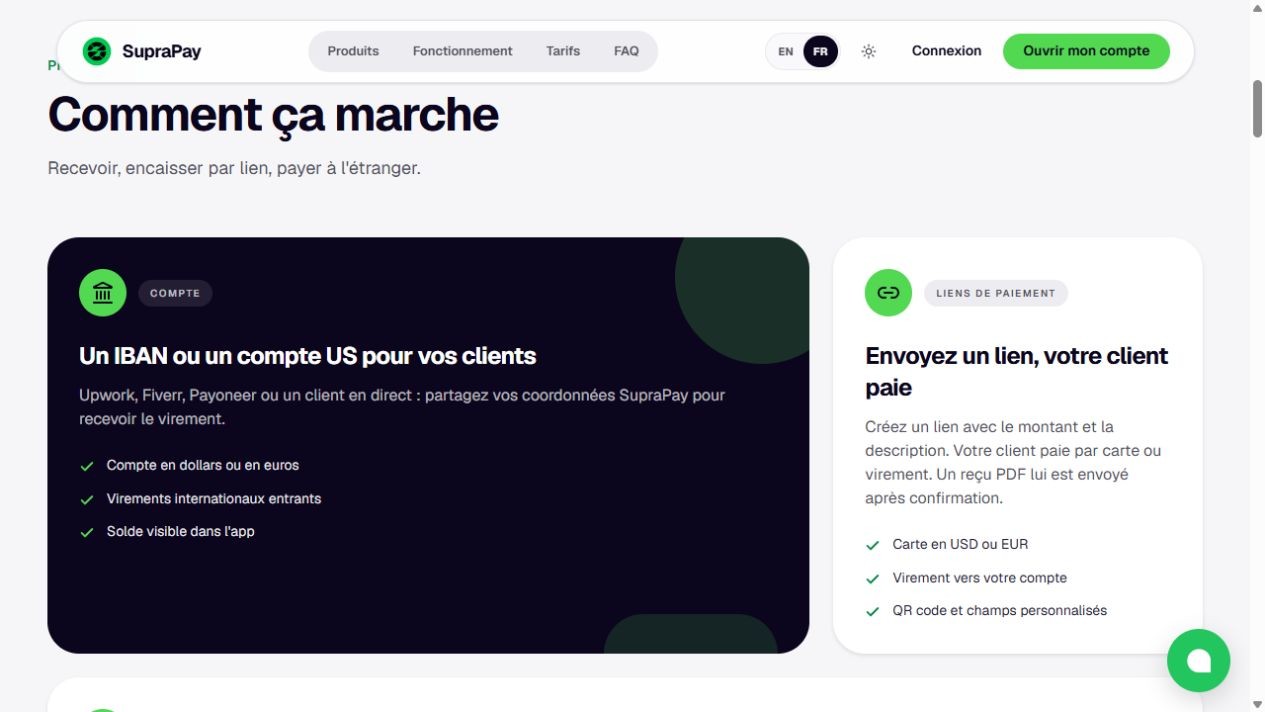
Screenshot of SupraPay’s French public website on 18 October 2026. The left panel presents receiving account details; the right panel presents payment links. This is a service overview, not a customer account or real transaction.
Choose a method that fits the client’s process. For a transfer, provide the exact receiving details and instructions available in your account. For a link, check the amount, currency and description before sharing it. Never reconstruct account details from an example.
3. Confirm access before promising this payment method
The FAQ states that identity verification is mandatory to open an account and carry out transactions. Check the official service for the applicable conditions and required documents, then wait for confirmation of your access and available features before offering them to a client.
The site advertises account opening without a monthly subscription, but separately lists a 10 USDC bank account activation deposit, described as credited back to your balance after USD 100 in received transfers. Check the exact terms, funding method and refund conditions with support before committing that amount. USDC is the unit SupraPay specifies; do not confuse it with a payment in CFA francs.
Also check limits, supported currencies and transfer networks, possible review delays and what happens if a transfer is rejected. Do not promise instant payment without a confirmed timeframe for the specific transaction.
4. Send a professional payment request
Message to adapt: “Hello [name], under our quotation [reference], the advance payment of [amount and currency] is due for [stage]. You can pay by [transfer to the details provided / payment link]. Please use invoice reference [reference]. Check the displayed fees before confirming and let me know once payment has been made. I will confirm receipt after checking my account.”
Attach your invoice or advance payment request according to the arrangement agreed. A payment receipt does not automatically replace your service invoice. Keep a clear link between the client, assignment, invoice and payment reference.
Do not share passwords, login codes or transaction validation codes with a client. They need the payment link or relevant receiving details, not access to your account.
5. Calculate fees without confusing the invoice with the available balance
When checked, the SupraPay pricing page advertised:
- 3% on incoming bank transfers;
- 0% SupraPay commission on Mobile Money withdrawals;
- 6% for a card payment through a link, presented as payable by the client;
- A 10 USDC activation deposit, with the refund threshold described above.
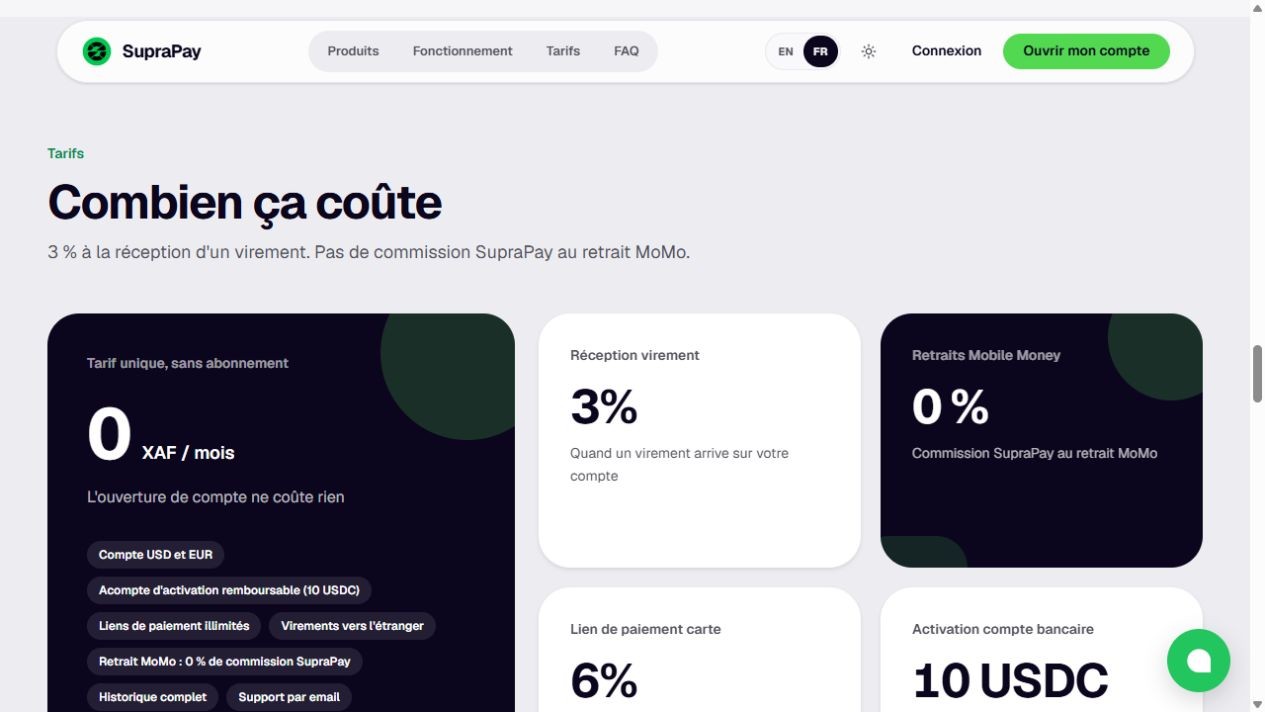
French pricing page captured on 18 October 2026: 3% incoming transfers, 0% SupraPay withdrawal commission, 6% card payment links and a 10 USDC activation deposit. Check current terms and your transaction summary before confirming.
Illustrative calculation: for a USD 200 transfer subject only to the advertised 3% charge, USD 200 × 3% = USD 6, leaving USD 194 after that single deduction. This is not an estimate of the final amount received in XAF.
Sending bank, intermediary or operator charges, and the exchange rate, can affect the total cost. Check what actually applies. Do not automatically add the 3% and 6% charges together: ask how fees interact for your chosen payment route. “No SupraPay withdrawal commission” does not necessarily mean “no total cost”.
6. Confirm receipt and prepare a withdrawal in Cameroon
A screenshot from the client is not your confirmation of receipt. Check the payment status and available amount yourself in the service. If payment remains pending, contact official support with the relevant reference rather than creating multiple requests for the same invoice.
SupraPay advertises withdrawals to MTN or Orange Money. Its FAQ includes Cameroon among the supported countries. However, the FAQ listed 12 countries while other parts of the page advertised 14: confirm your country, operator and withdrawal conditions rather than relying on the overall country count.
Before confirming a withdrawal, check the recipient number, any limits, conversion currency, exchange rate, charges and amount to be received. Keep both payment and withdrawal records. These help you track assignments and prepare accounting records with a professional when needed.
Your checklist before the first assignment
- The client has agreed to the price, currency, milestones and fee allocation.
- Your access and receiving details are confirmed.
- The client accepts the proposed payment method.
- You have checked pricing, exchange rates, limits and withdrawal conditions.
- You know how to confirm receipt and retain supporting records.
To prepare your next application or service proposal, browse Kamerjob vacancies. If someone requests secret codes or pressures you to make a payment, read our guide to spotting a fake job offer.
Sources and screenshots: SupraPay’s public website, Products, How it works, Pricing and FAQ sections, checked on 18 October 2026. Features and conditions are those presented by the provider, without a guarantee of account or transaction approval. Examples are fictional.
The Kamerjob team
Comments
Loading comments…