How to spot a fake job offer in Cameroon

Does a job advert promise immediate employment, followed by a request for Mobile Money fees? Does a WhatsApp message use a major company’s logo but refuse to explain where you would work? Before paying or sending documents, take time to check.
A fake vacancy may be designed to take your money, collect personal information or get you to carry out transactions for a stranger. Here are warning signs and practical checks for jobseekers in Cameroon.
1. Recognise the signs that mean you should stop and check
- Payment to secure the job: application, reservation, badge or compulsory training fees demanded immediately by an unverified contact.
- An unrealistic promise: very high pay for vague duties, guaranteed recruitment without assessing your background or easy earnings for a few clicks.
- Artificial urgency: “Pay in ten minutes”, “do not contact head office” or “keep this process secret”.
- An identity you cannot confirm: no clear company name, inconsistent address, evasive answers about duties or refusal to allow independent checks.
- Requests unrelated to an application: your Mobile Money PIN, login codes, installing an APK file or using your account to receive and forward money.
A logo, PDF contract or online interview does not by itself prove that recruitment is genuine. Equally, a spelling mistake or free email address is not enough to label a vacancy fraudulent: small businesses also use simple tools. Consider the overall picture and cross-check the details.
2. Verify the employer through a separate route
- Record the advertised details: employer, role, town, reference, recruiter’s name and application channel.
- Research the company independently: open its known website or find consistent contact information across several sources, rather than relying on the link in the message.
- Contact the relevant department: ask whether the vacancy and recruiter are genuine, using contact details you found yourself.
- Compare the details: the title, deadline, location, email address and procedure should be consistent. A vacancy missing from the company website is not proof of fraud; it calls for confirmation.
Message to adapt: “Hello, I received an offer for the [job title] position, reference [reference], in your company’s name. Could you confirm that this recruitment and this person are part of your hiring process? Here is the advert link.”
Read website addresses in full. A padlock or HTTPS does not guarantee that a site belongs to the named employer. Do not enter your Kamerjob password on a page sent in a message: open the usual site yourself.

Asking someone you trust to review an offer may help reveal inconsistencies. Illustrative photo: Christina Morillo / Pexels.
3. In practice: three suspicious messages and how to respond
“Send FCFA 5,000 to reserve your place”
Fictional example: “Your application has been accepted. Send FCFA 5,000 to this personal number before noon for your badge, or we will give your place to someone else.”
Response: do not pay under pressure. Keep the message and check the procedure with the company through a different contact. An invoice or receipt supplied by the same stranger is not independent verification.
“Send the code you received to validate your application”
Fictional example: “You have just received a text message. Give us the code to activate your candidate account and payment.”
Response: never share login, verification or payment codes. Applying for a job does not require giving someone access to your messaging account or mobile wallet. Orange Cameroon specifically advises customers to never share their Orange Money PIN.
“Top up your balance to unlock your commission”
Fictional example: “You have earned money by liking content. Make a deposit to access premium tasks and withdraw your earnings.”
Response: stop making payments. A small initial payment does not establish that the scheme is trustworthy. Do not pay more to recover an amount displayed in an app. Do not lend your account to move money for other people either.
4. On Kamerjob: read the full vacancy and report inconsistencies
From the job listings, open the complete advert. Check duties, location, contract, deadline and application instructions. If someone later requests a different procedure or money, have the discrepancy checked before proceeding.
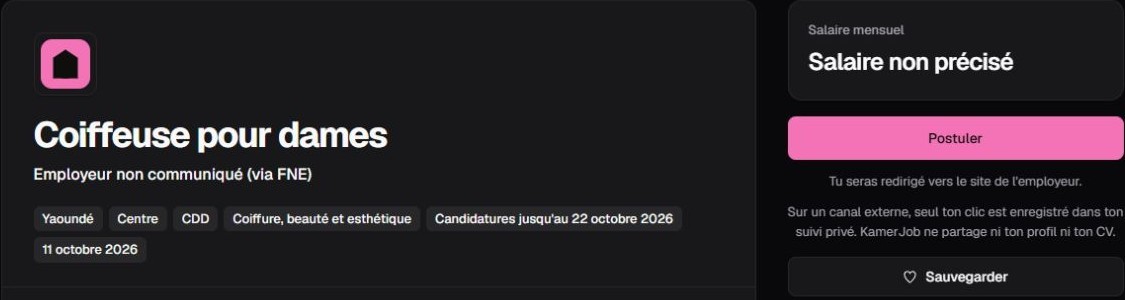
Kamerjob screenshot captured on 17 October 2026: an example for learning to read a vacancy. The vacancy pictured is not presented as suspicious or necessarily still open.
How to report a suspicious job offer on Kamerjob
Kamerjob lets you report a vacancy directly from its details page. An advert appearing on the platform does not replace your own checks: if you encounter a request for money or inconsistent information, share the facts with the team.
- Open the full page for the vacancy concerned from the job listings.
- Find “Report this job” in the actions area, below “Back to jobs”. On a small screen, scroll down to reach this area.
- Select the appropriate reason: “Scam or fees requested”, “Inappropriate content”, “Spam”, “Misleading offer” or “Other”.
- Add facts in “Details (optional)”: what you were asked for, the date and how it differs from the advert’s instructions. Do not enter secret codes, passwords or unnecessary private information.
- Review your report, then click “Send report”. If the site asks you to sign in, complete that step on Kamerjob before continuing.
In pictures: the button and the form
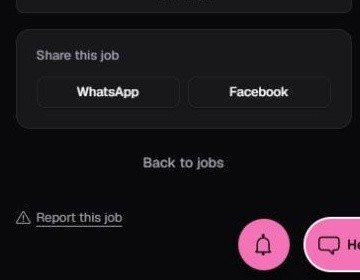
1. In the vacancy’s actions area, click “Report this job”.
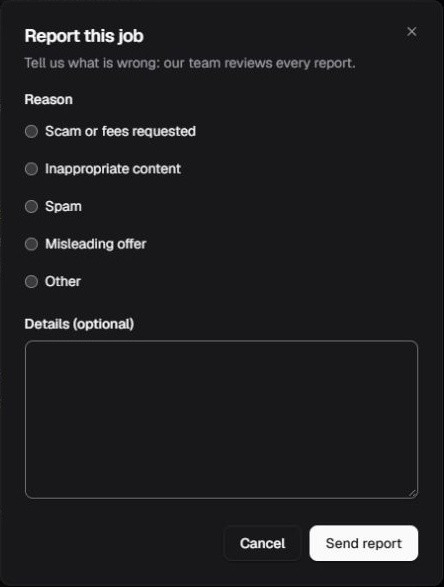
2. Choose a reason, add details if needed, then send your report. Demonstration screenshots from 18 October 2026: no report was submitted and no vacancy is being presented as fraudulent.
The form states that the team reviews every report. Reporting requests a review; it does not by itself establish fraud or guarantee immediate removal. If you cannot use the button, use the Kamerjob contact page, including the vacancy link and a factual description.
Report to adapt: “Regarding vacancy [link], a person claiming to be [role] asked me for [exact request] on [date]. This request does not appear in the advert. Could you check it? I have not made a payment.”
Avoid posting accusations or personal contact details in groups. A precise report enables checks without unnecessarily exposing the people concerned.
5. Already replied or paid? What to do next
Stop communicating and do not send more money. Save screenshots, links, numbers, messages and transaction references before blocking the contact. If you paid, quickly contact your Mobile Money provider or bank through official channels to ask what action is possible. A refund cannot be guaranteed.
If you entered a password on a fake page, change it through the genuine service and secure any other accounts where you used it. If you shared a PIN or financial access, contact the provider immediately. If you sent identity documents, mention that when reporting what happened.
You can report the facts to the police or gendarmerie and provide the evidence available. For Orange Money, consult the official reporting channels. Be wary of anyone promising to recover your money in exchange for further fees.
Before your next application: verify the recruiter, understand the job, follow the advertised channel and keep your codes secret. If a request puts you under pressure, pause and seek independent confirmation.
Prevention sources consulted on 18 October 2026: FTC, Job Scams (general scam mechanisms, excluding US reporting procedures) and the official Orange Cameroon pages linked above. The three messages are fictional and do not refer to any real company.
Illustrative photos: Tima Miroshnichenko / Pexels and Christina Morillo / Pexels. The people pictured are not presented as fraud victims or perpetrators. Screenshot: Kamerjob.
Cover photograph: Monstera Production / Pexels. Illustrative image.
The Kamerjob team
Comments
Loading comments…